Personal生活
- Medication log用药记录
- Garden watering tracker植物浇水记录
- Trip packing checklist出行打包清单
PERSONAL AI TOOL CHEST个人 AI 工具箱
Describe a personal tool in plain language. InOne builds it, keeps it on your phone, and lets you improve it by talking.用自然语言描述你想要的工具。InOne 把它做出来,留在你的手机里,之后你只用说话就能改进它。
Built for Android and iOS. Store links go live at release. You bring credentials for a supported AI provider.为 Android 与 iOS 打造。商店链接将在发布时开放。你需要自备受支持 AI 服务商的凭据。
THE PROBLEM问题所在
Almost right差一点合用
Exactly right正好合用
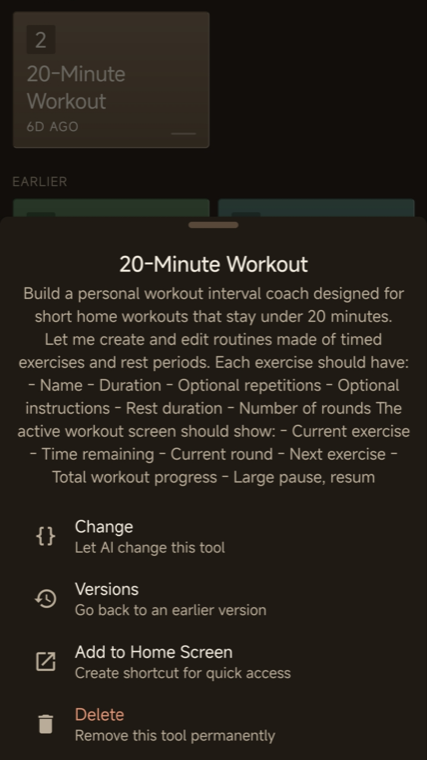
“A 20-minute workout coach with my own intervals, big pause buttons, and a beep three seconds before each rest ends.”“一个 20 分钟锻炼教练:用我自己的间歇设置、大号暂停按钮,并在每段休息结束前 3 秒提示音。”
Described in the app, built in one session, kept for good.在应用内描述,一次生成,长期保留。
HOW IT WORKS工作方式
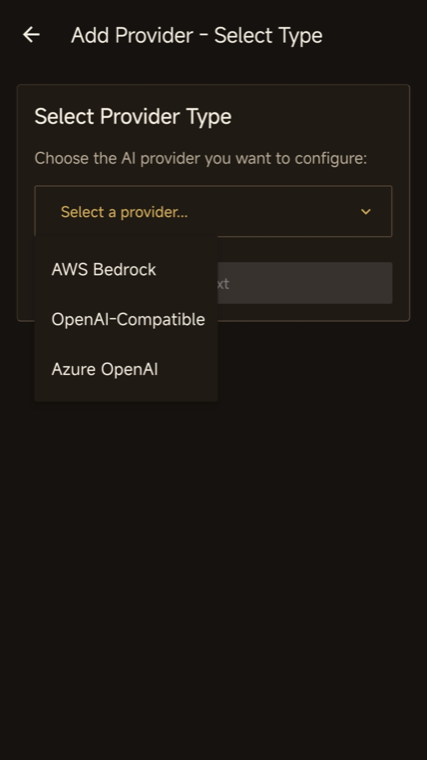
Add credentials for AWS Bedrock, Azure OpenAI, OpenAI, or a supported OpenAI-compatible endpoint. They are stored in your device keychain.填入 AWS Bedrock、Azure OpenAI、OpenAI 或受支持的 OpenAI 兼容地址的凭据。凭据保存在设备钥匙串中。
Write what you need the way you would explain it to another person. No fields to model, no schema to design.像向别人解释一样写下你的需求。不需要设计字段,也不需要设计数据结构。
Specialized agents design, build, and check the tool. Generation takes tens of seconds to a few minutes, and the steps stay visible while you wait.多个专职智能体分别负责设计、实现与检查。生成通常需要数十秒到几分钟,等待过程中步骤始终可见。
Open the finished tool inside InOne and use it. Ask for changes in the same plain language whenever it should fit better.在 InOne 内打开生成的工具直接使用。想让它更贴合时,用同样的自然语言提出修改。
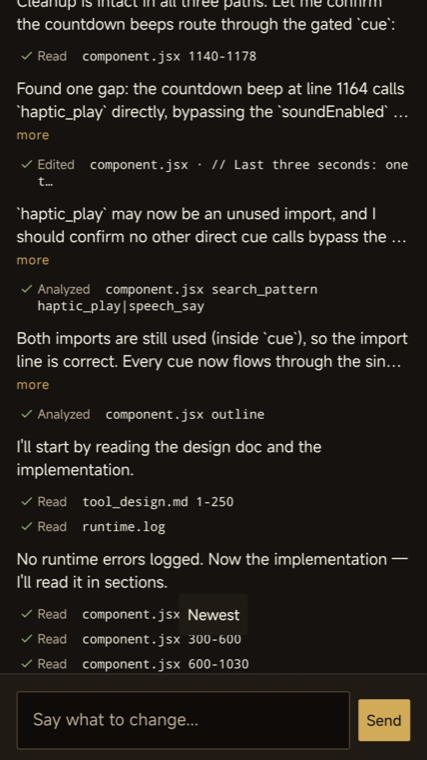
A build takes real time, so InOne shows it. You can see which step is running, what has been checked, and how long it has taken — and you can cancel a run.构建确实需要时间,所以 InOne 把过程展示出来。你能看到当前进行到哪一步、检查了什么、已经花了多久,也可以中途取消。
Screens captured from InOne 1.6.3 on Android. Your results depend on your request and the model you connect.截图取自 Android 版 InOne 1.6.3。实际结果取决于你的描述与所连接的模型。
WHAT PEOPLE ASK FOR人们会要求什么
Personal生活
Work工作
Hobby兴趣
These are examples of requests, not bundled templates. Every tool is generated from your own description.以上是需求示例,并非应用内置模板。每个工具都由你自己的描述生成。
THE COLLECTION工具的累积
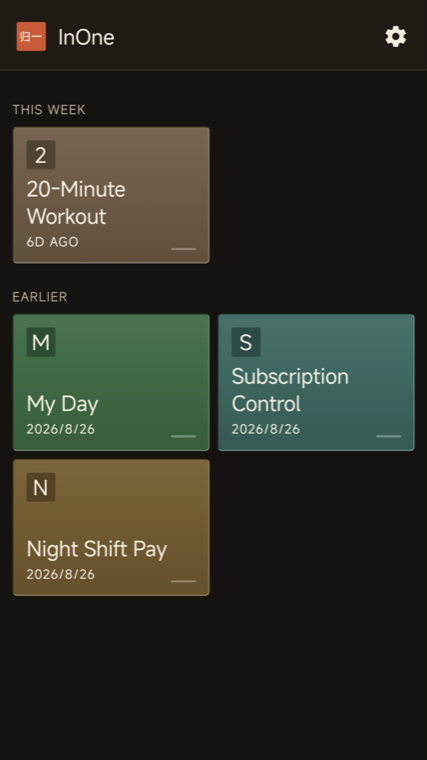
One generation is a demo. A collection is a habit. Each tool you keep becomes another drawer in the same chest — the workout coach beside the night-shift pay calculator beside the subscription tracker.生成一次只是演示,累积成一套才会成为习惯。你保留的每个工具都是同一个柜子里的一格抽屉——锻炼教练、夜班工资计算器、订阅管理并排放在一起。
Nothing to publish, nothing to host, no project to maintain. The tools you made are simply there, in one familiar place.无需发布、无需托管、也没有需要维护的项目。你做的工具就放在那里,在同一个熟悉的地方。
MADE FOR THE PHONE IN YOUR HAND为你手上的这台手机而做
Entries, lists, settings, and records saved on the device.条目、列表、设置与记录保存在设备本地。
Camera, photos, video, audio recording and playback, speech to text, and text to speech.相机、照片、视频、录音与播放、语音转文字与文字转语音。
Notifications, alarms, timers, calendar events, and background work.通知、闹钟、计时器、日历事件与后台任务。
Motion, orientation, compass, pressure, and step counting where the hardware supports it.在硬件支持的前提下读取运动、姿态、指南针、气压与步数。
Maps, network status, local network discovery, Bluetooth LE, and NFC tags.地图、网络状态、局域网发现、蓝牙 LE 与 NFC 标签。
Forms, lists, charts, animation, QR codes, files, PDFs, and math.表单、列表、图表、动画、二维码、文件、PDF 与数学计算。
What a tool can do depends on your request, your device hardware, and the permissions you grant. Generated tools can only use capabilities InOne has registered, and their code is validated before it runs.工具的能力取决于你的描述、设备硬件以及你授予的权限。生成的工具只能使用 InOne 已注册的能力,其代码在运行前会经过校验。
CHANGE IT BY TALKING用说话来修改
“Add a weekly total and make the Save button larger.”“加一个每周合计,把保存按钮做大一些。”
InOne rebuilds the tool with that change and keeps the rest as it was.InOne 会按这个要求重建工具,其余部分保持原样。
YOUR AI, YOUR CHOICE你的 AI,你来选
What leaves your device. To create or change a tool, InOne sends your description and the context needed for the build directly to the provider you selected. That provider processes it under its own terms and privacy policy, and may charge for model usage separately from the app.哪些数据会离开设备。创建或修改工具时,InOne 会把你的描述以及构建所需的上下文直接发送给你选择的服务商。该服务商依其自身条款与隐私政策处理这些数据,并可能就模型用量单独收费。
BEFORE YOU INSTALL安装之前
Yes. You need an account and compatible credentials with one supported provider before you can create a tool.是。创建工具前,你需要在一家受支持的服务商拥有账号和可用凭据。
No. Model usage is billed by the provider you choose, under that provider’s own terms.不包含。模型用量由你选择的服务商按其自身条款计费。
Local functionality in an existing tool may keep working offline. Creating a tool, changing it, AI calls, and web features need a connection.已生成工具的本地功能可能在离线时继续可用。创建工具、修改工具、AI 调用和联网功能都需要网络。
Tens of seconds to a few minutes, depending on the tool and the model. The build steps stay visible while it runs.视工具复杂度与模型而定,通常为数十秒到几分钟。构建过程中的步骤始终可见。
Not currently. Tools run inside InOne and are not exported as separate store apps.目前不行。工具在 InOne 内运行,不会导出为独立的商店应用。
Not currently. There is no InOne account and no tool-sync backend, so a tool lives on the device that made it.目前不会。InOne 没有账户体系,也没有同步后端,工具保存在生成它的那台设备上。
Any supported provider you already have access to. The current list and presets live in the provider setup screen inside the app.选择你已经能访问的任一受支持服务商。最新支持列表与预设可在应用内的服务商配置页查看。
English and Simplified Chinese. The app follows your device language and falls back to English.英文与简体中文。应用会跟随设备语言,并在无法匹配时回退为英文。
InOne is preparing for release on Google Play and the App Store.InOne 正在准备在 Google Play 与 App Store 发布。
Questions or feedback? Reach us at有问题或反馈?请联系 wendydevilqueen@gmail.com